Managing Expenses
This guide explains how to record warehouse operational expenses in Distritour.
Access
In the left sidebar, go to Operations, then click on Expenses.
Overview
The expenses page displays a table with all recorded operational expenses.
Main columns:
| Column | Description |
|---|---|
| ID | Unique expense identifier. |
| User | User who recorded the expense. |
| Circuit | Circuit associated with the expense (if applicable). |
| Amount | Expense amount. |
| Reason | Description/reason for the expense. |
| Date | Date and time of expense. |
Creating an Expense
Steps
- Click + Add or Create.
- Fill in the information:
| Field | Type | Description |
|---|---|---|
| Depot | Toggle | Enable for warehouse expense, disable for carrier/circuit-related expense. |
| User | Selection | (if Depot disabled) Select the associated carrier. |
| Circuit | Selection | (if Depot disabled) Select the associated circuit. |
| Reason | Selection | Category or reason for expense (rent, transport, etc.). |
| Amount | Number | Expense amount. |
| Comment | Text | (Optional) Additional notes or details. |
| Date | Date | Date of expense. |
| Time | Time | Time of expense. |
- Click Save.
Use Cases
- Monthly warehouse rent payment.
- Recording freight charges.
- Documenting general expenses for accounting.
⚠️ Warning: Deleting an expense is permanent.
Change History
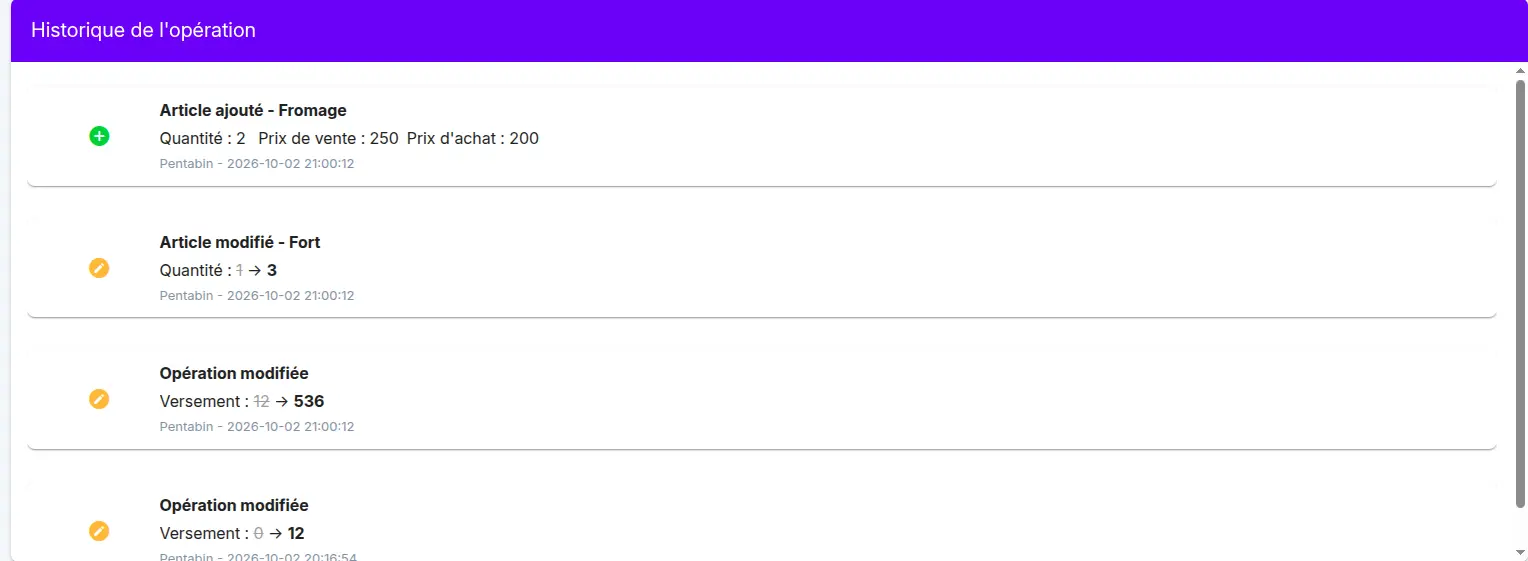
Every change made to this record is captured automatically, for example a change to the quantities, prices or items of an operation, or the amount paid.
The changes can be seen in the change history table, on the operation page. For each change, it shows:
- what happened (added, modified)
- the field concerned, with its old value crossed out and its new value
- the user who made the change and the date and time
This lets you know who changed what, and when.