Charge Requests
This guide explains how to view carrier charge requests in Distritour. A charge request allows a carrier to request the warehouse to load products via their mobile app.
Access
In the left sidebar, go to Operations, then click on Charge Requests.
Overview
The charge requests page displays a table with all requests created by carriers from their mobile application.
Main columns:
| Column | Description |
|---|---|
| ID | Unique request identifier. |
| User | Carrier who created the request. |
| Amount Sell | Selling price amount of requested products. |
| Amount Buy | Purchase price amount of requested products. |
| Date | Date and time of request. |
How Requests Are Created
Charge requests are created exclusively by carriers from their mobile application:
- Opens their mobile app and goes to Charge Requests section.
- Selects the products needed and their quantities.
- Sends the request to the warehouse.
The request then appears in this view where warehouse staff can review and process it.
Change History
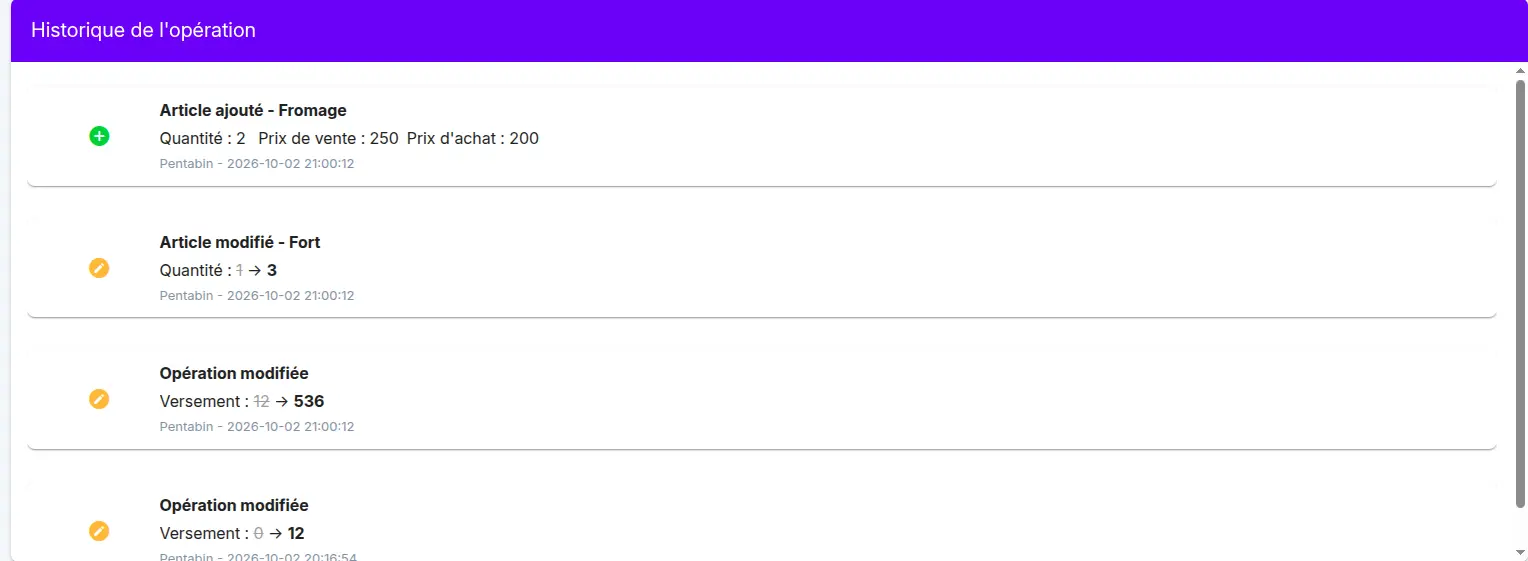
Every change made to this record is captured automatically, for example a change to the quantities, prices or items of an operation, or the amount paid.
The changes can be seen in the change history table, on the operation page. For each change, it shows:
- what happened (added, modified)
- the field concerned, with its old value crossed out and its new value
- the user who made the change and the date and time
This lets you know who changed what, and when.